
Ink blot test
Ink blot test
By PIDJIN.NET
More Pidjin Psychology here
February 28, 2014 at 7:40AM
via Fredo and Pidjin. The Webcomic. » Fredo & Pid’Jin http://ift.tt/1mMhU3z
Saturday bike ride at the park
Not feeling great this morning…
February 28 2014
Excellent
February 28, 2014
By
Oh my GOD February is over.
February 27, 2014 at 11:00PM
via Saturday Morning Breakfast Cereal (updated daily) http://ift.tt/1obdIcA
How Wolves Change Rivers
Fascinating changes in ecosystems based on introducing a new apex predator.
How Wolves Change Rivers
By
When wolves were reintroduced to Yellowstone National Park after being absent for almost 70 years, their presence had an astounding effect on nearly everything in the park. Writer and Environmentalist George Monbiot explains the impact they had in this video from Sustainable Man.
February 25, 2014 at 1:55PM
via Outside Magazine: All Feeds http://bit.ly/1fnTGGt
Download Wrappers and Unwanted Software are pure evil
For all those nontechnical types- you’re being scammed…
Download Wrappers and Unwanted Software are pure evil
By Scott Hanselman
Call it Adware, Malware, Spyware, Crapware, it’s simply unwanted. Every non-technical relative I’ve ever talked to has toolbars they apparently can’t see, apps running in the background, browser home pages set to Russian Google clones, and they have no idea how it got that way.
Here’s how they get that way.
You go to download something reasonable. I wanted to download a Skype Recorder, so I went here. (Yes, I linked here to the URL because they don’t need Google Juice from me.)
OK at this point I’m screwed. The green button CLEARLY desperately wants me to click on it. I totally ignore the tiny "Direct Download Link" below the friendly button. I have no idea what that glyph icon means, but it’s pointing down, so that must mean download.
Welcome to the Download.com installer! How helpful!
More green buttons, awesome. Let’s go!
Pre-selected Express installation? Super helpful, I love that. Ah, and next to it there’s text in the same font size and color that I totally won’t read that says:
Install Search Protect to set [CHANGE] my home page and [TOTALLY MESS UP] default search to Conduit Search [THAT I HAVE NEVER HEARD OF AND NEITHER DO YOU] and [NOW THIS IS AUDACIOUS…] prevent attempts to change my browser settings.
In other words, we, Download.com, are going to totally change the way you use you computer and browser the way and prevent you from easily changing it back. We’re going to do it now, when you press Next, and oh, by the way, we have Admin on your computer because just a moment ago you pressed YES on the Windows Warning that we could mess things up, because everyone ignores that.
Or, you can click Custom, because non-technical relative ALWAYS clicks Custom. NO. They don’t. Technical people ALWAYS press Custom. ALWAYS. Always. Other people? Never.
Ah, nice, when I press Custom it’s set to…wait for it…the same stuff that was gonna happen if you pressed Express.
AND WE ARE ONLY ON STEP 2. What ever happened to clicking just once and getting what I needed?
OMG "It communicates several times a day with servers to check for new offers and change ads on my computer?" I totally want that. Thanks Green Button!
I’m sure that if I press Decline here that it will mess up my installation of the original thing I wanted to install…I have forgotten what that was, but I’ll just keep going.
Weird. I thought I was already here. I’m sure I want this also.
Huh. Does my Mouse not work? I’ll click it again. Backing up my files without asking seems legit.
Install Now? What have we been doing all this time?
I am disappointed in us, Internet, that this is a business. Someone wrote this, for their job, directed by their middle manager, who was directed by their rich boss. There was a meeting (there’s always a meeting) where it was discussed on how we could most effectively fool non-technical relatives into installing crap.
These are Dark UI Patterns.
A Dark Pattern is a type of user interface that appears to have been carefully crafted to trick users into doing things, such as buying insurance with their purchase or signing up for recurring bills.
This isn’t cool and it needs to stop. I won’t be visiting Download.com anymore.
I’ll only install software from Vendors I trust, like Oracle…
Gosh, maybe I need to install that "Crap Cleaner" everyone talks about so I can remove these unwanted toolbars.
Ok, forgot it. I’ll just stick with the official Windows Updates because I’m sure I want all those.
So, um. Yeah.
Sound off in the comments.
© 2014 Scott Hanselman. All rights reserved.
February 11, 2014 at 7:15PM
via Scott Hanselman’s Blog http://bit.ly/1gdygAu
Reporter app, for self-discovery through data
Reporter app, for self-discovery through data
By Nathan Yau
Nicholas Felton, Drew Breunig, and Friends of the Web released Reporter for iPhone. The app—$3.99 on the app store—prompts you with quizzes, such as who you’re with or what you’re doing, sparsely throughout the day to help you collect data about yourself and surroundings. You can also create your own survey questions to collect data on what interests you and use your phone’s existing capabilities to record location, sound levels, weather, and photo counts automatically.
Those who are familiar with Felton’s annual reports will recognize the design of the app, as it has a familiar look and feel, and it works almost how you’d expect an interactive version of his printed reports would. The charts are straightforward. They provide a quick summary of the data you collect.
But back to the survey collection process. This is the part that interests me most, because as those who have collected data about themselves know, the collection is the hard part and the most important.
When collection is all automatic, it’s easy to forget about and oftentimes we lose context, whereas when collection is all manual, you have to remember to log things and collection grows to be a chore. Reporter is a hybrid between automatic and manual. The automatic part serves as metadata, and the manual portion tries to be as quick and painless as possible (and it is for the most part).
I’ve been using the app for the past week, and it’s actually kind of fun to collect. It takes about as much time as a check-in on Foursquare or a status update on Twitter or Facebook, and all the data stays on your phone or saves to Dropbox, if you like. Export your data as CSV or JSON.
From there, do what you want, because it’s your data. Most people will probably stay inside the app, but the best part is what can be done outside.
Of course, this is still the honeymoon phase of personal data collection, where I want to log everything in the whole wide world. I’ll let you know what it’s like in a month. For now though, the Reporter app is nice.
I’m a sucker for these kinds of apps…
February 13, 2014 at 6:34AM
via FlowingData http://bit.ly/1c13Yzb
Google Digital Attack map
This is a really neat “live” map of active internet attacks.
The Local Hotspot Problem
I love the functionality of “Local Hotspot” from AT&T. This lets my non-3G iPad connect through my phone. I have used it in the car and on vacation, but primarily I use it at work.
I had grandfathered into the unlimited data plan that was available with the original iPhone 3G. It was a hard decision to switch to the 4GB/mo data plan and get Local Hotspot. But I felt as though the additional capability it gave me with the iPad away from WiFi was worth it.
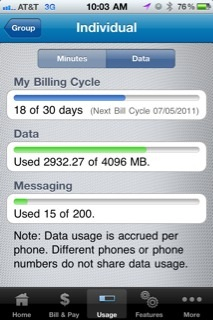 And, in general, I am happy with it overall. The other day I took my MacBook Pro to work and used the Hotspot with it. I didn’t really do a lot on that machine, since I use a Windows desktop to do work, I had brought it in to tweak a few graphic images. However, that little bit of laptop surfing / email pushed my usage higher than my time remaining til refueling…
I’m sure I’ll go over my 4GB soon and pay the additional $10/GB. AT&T priced this functionality at just the right point for me. And by that, I mean that I am willing to pay it, but it is just about the most I would be willing to pay. I’ll mostly stay just below the 4GB allowance per month, but I don’t like altering my normal usage because of the data limits.
I do have WiFi available at work, but I am hesitant to use it for a couple of reasons:
- It requires an cumbersome authentication using a SecurID keyfob. More than 10-15 minutes of inactivity require reauthentication.
- It goes through a corporate proxy server.
When I have app updates to install, or some large transfer, I’ll connect the iPad to the corporate WiFi. But for just casual email reading, surfing, and twitter reading, I find the Local Hotspot to be the ticket to happiness.
The Kindle
I have had an iPad since they were introduced, and not long after I got it, I bought my wife an Amazon Kindle:
She loved it. I got her the Kindle green case with built-in light and she carries it everywhere. I was so impressed, I got one too. The display of the Kindle is phenomenal. You know when you buy electronics, they sometimes come with a sticker over the display to simulate what it would look like, but you can tell it is just printed on a piece of clear plastic. Well, when the Kindle first came in, I thought it had one of those stickers and I was surprised when I learned that it was the display itself- Super crisp, clear text. Of course, the downside of that crisp e-ink look is the slow speed of changing pages. Thankfully, reading text doesn’t require that many page turns and the speed is not a problem.
Some people claim the iPad is a Kindle killer, but I disagree. When reading some long-form text, I always look for it first for the Kindle, and then the iPad as a 2nd place reading device.